Croptivity -
Scouting Location Marker

My roles: UX designer, UI designer, user researcher
Team: 2 product owners, 4 engineers
Project Duration: 4 months
Croptivity is a mobile app that assists farmers in managing and scheduling activities on their farms. The scouting location marker is an essential component of this app, helping farmers record their locations while scouting in the crop field.
We had four farmers who were at risk of leaving us because they relied on the location marker feature for their scouting activities, and this feature was initially removed. To mitigate this, we identified key areas for improvement and successfully released the feature on time. As a result, we retained all four farmers, saving the company approximately $5,000 per customer.
By removing a cancel button on the app, we prevent a farmer's hard work, which is worth 30 hours (6 rounds of scouting, 5 hours each time), from being lost accidentally each year. Here's what a farmer said,
"I used to lose average 6 times of our scouting work every year because I accidentally hit the cancel button when I was using Croptivity to scout. It usually takes me a few hours to finish a field. Now I'm happy to see the cancel button is gone. I don't need to worry anymore."
The ideal process would involve research before design. But the reality of this project came with constraints, the project required a more flexible approach. As a result, I began exploring solutions while concurrently planning user research, as shown in the following chart.

After multiple rounds of discussion with the team, several key takeaways emerged:
Farmers require a way to document their observations when scouting in the crop field.
Crop scouting enables farmers to stay informed about field conditions, such as pest or disease outbreaks. By recording the locations of these issues in the field, farmers can easily share this information with farm employees equipped with specialized tools or treatments, facilitating effective management.
The scouting marker should maintain the current information architecture within the app and make use of existing components, such as the map and task assignment features.
After several rounds of discussions with the team, I still had questions about user behaviors and their environment. In theory, I would have preferred to conduct a series of contextual inquiries to observe user behaviors during scouting, followed by interviews.
However, due to remote work constraints and the fact that September is harvest season, making it difficult to reach farmers, I opted for a conceptual task analysis flow to deduce how users might complete a scouting task.
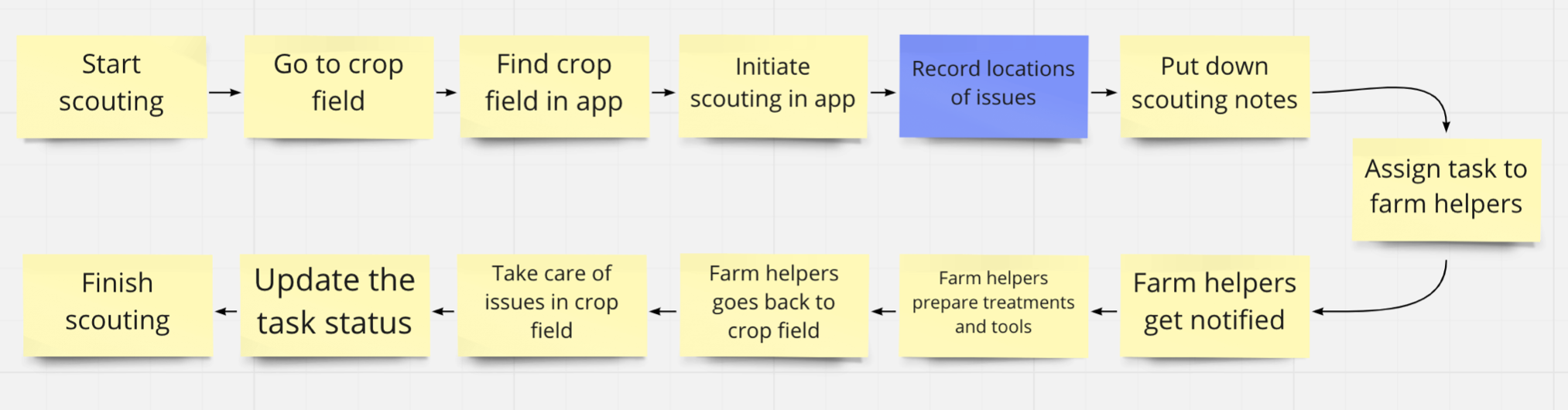
With the conceptual task flow, I started to brainstorm ideas of marking scouting locations while drafting a user interview plan, aiming to learn,
I had some preliminary ideas for marking scouting locations.
This idea was grounded in a few assumptions. Firstly, users capture photos as evidence during scouting. Secondly, users are open to permitting geographic tracking for their photos.
The assumption here was that locations are digitally marked as scouting takes place
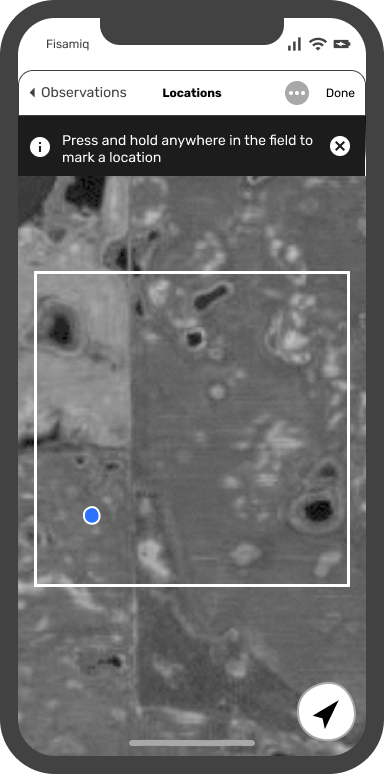

I had additional concerns regarding the assumptions for this idea. Firstly, the satellite images could potentially be outdated. Secondly, I was worried about the accuracy and level of detail in satellite imagery. After a brief discussion with product owners and engineers, we abandoned this idea due to technical limitations.
With the help of Customer Success Managers, I managed to interview five farmers in October who routinely conduct scouting activities in their fields. Here are some of the interview questions I asked:
Certain key behaviours repeatedly appeared in the interview response,
Based on the interviews, I've translated the research insights into user needs statements, which include:
The idea of capturing geographic locations from photos was dismissed due to its high demand for user attention and the need to manipulate the camera's direction. This approach could potentially pose a safety hazard when a user is driving.
Here are some proposed changes for Idea 2 - Idea 2: Enabling on-the-go location marking
1 To reduce the attention required for marking a location, users can simply tap a dedicated button at the bottom of the screen to mark their current location, rather than pinpointing it precisely on the map.
2 "Back" or "Cancel" buttons will be hidden when a user is on the location marking page, eliminating possibilities of accidentally deleting scouting progress.
3 To distinguish locations marked by different users in the same field, a tag featuring the user's initials along with a sequence number will be added to the pin icon.
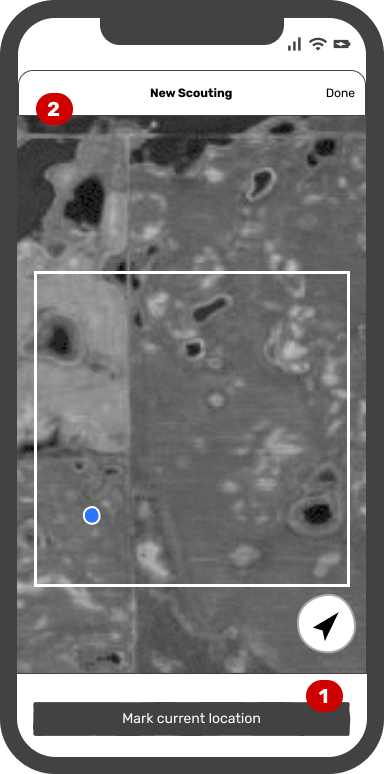

After presenting the iterations to the engineers, we encountered a noteworthy concern. There were instances when GPS reception on mobile devices didn't function properly in crop fields, causing the app to be unable to track the user's location and mark it on the map. This raised a critical question: "How should we address the situation when a user's location is not visible on the map or is far outside the field boundary?"
Following discussions with a specialized GIS engineer, we arrived at a solution. In cases where a user's current location was unavailable or outside the field boundary, the app would drop a pin at the center of the field. Subsequently, the user would receive a prompt to manually adjust the pin to the correct location.

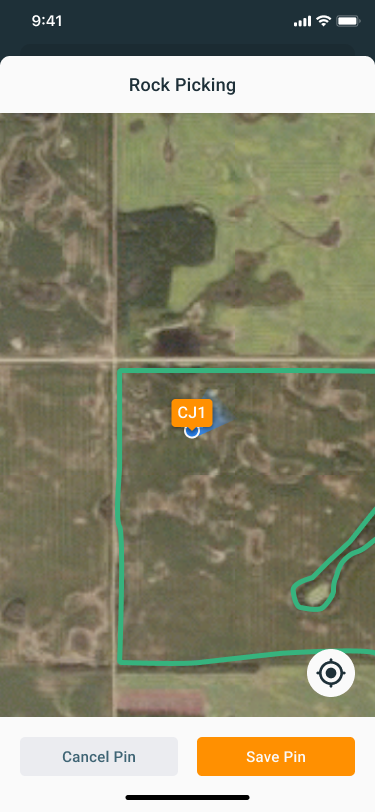

Given our current remote working situation, it's challenging to conduct observation studies or usability testing in the real environment. However, I'm eagerly anticipating the opportunity for a field visit when we can meet our farmers in person.